


Messenger - Color SMS
4.32.28K Reviews
App Specs
- Version
- 2.14.0
- Updated On
- License
- Free
- Downloads
- 10,000,000+
- Developer
- Maxlabs Personalization Tools
- Categories
- Communication
- Platform
- Android
Screenshots
 Analysis by AppCompare
I find it easiest to judge a messaging app by the small moments: whether I can tell one conversation from another at a glance, whether the screen feels comfortable to read, and whether the extra decoration helps rather than gets in the way. Messenger - Color SMS is aimed at people who want their texting space to feel less like a default utility and more like their own. That focus can be genuinely pleasant, though it also means the app’s appeal depends on how much you value visual customization over a familiar, restrained inbox.
As a communication app from Maxlabs Personalization Tools, it centers on changing the look and feel of SMS chats with colors, themes, and expressive styling. It is free to try, with optional in-app purchases ranging from $4.99 to $49.99 per item. I would approach those purchases as extras rather than a requirement: the main question is whether the available visual choices make everyday texting more comfortable for you. The app is rated for Everyone, and its broad audience makes that practical distinction worth considering: a playful design may suit one person while feeling too busy to another.
Readability and navigation in a colorful inbox
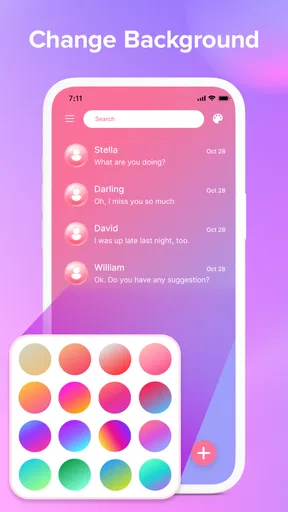
Color is useful when it helps me scan, not just when it looks lively. A distinctive theme can make the messaging screen feel more personal, and a consistent palette may help me recognize the app’s visual environment quickly. But decorative choices are not automatically readability improvements. If a combination feels low-contrast or visually crowded on your screen, a simpler option is likely the better choice, even if a brighter theme looks more striking in a preview.
When trying a new palette, I’d check it in an actual conversation rather than judging it from the selection screen. Read a few messages, look at names and timestamps, and see whether the visual hierarchy still feels clear. That quick test matters especially for long exchanges: an attractive background can become tiring when you are reading several screens of text. I’d also make one change at a time, so it is easier to tell whether the color, theme, or chat styling is what made the screen more comfortable.
Motor and sensory considerations
A messaging app is used in short bursts, often with one hand, so straightforward movement through conversations matters. The original experience I had with this app felt clean and easy to navigate, and I could switch between color palettes without much fuss. That lowers the effort of personalizing the interface. Still, anyone who finds small controls difficult should take time to check the on-screen layout on their own device; visual polish cannot compensate for controls that are uncomfortable to reach or distinguish.
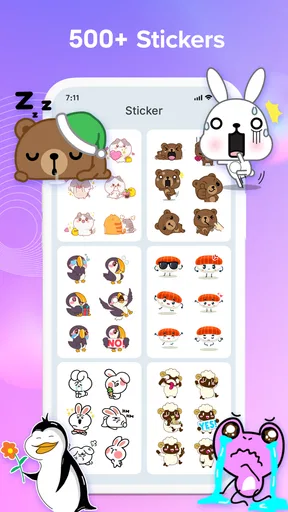
There is a useful trade-off between expressive styling and sensory comfort. Stickers and emoji can add tone when plain text might sound abrupt, but a conversation full of visual extras may be distracting for someone who prefers a quiet screen. I would use them selectively: a sticker can make a quick greeting feel warmer, while leaving ordinary messages uncluttered keeps the thread easier to scan. The right setup is not necessarily the most colorful one; it is the one that helps you communicate without adding visual noise.
Situational access: choosing the right moment and setup
In everyday use, I can picture customizing a thread for a close friend so it stands out from routine messages, then keeping the rest of the inbox calmer. Contact-specific notification choices can also help distinguish a message that needs attention from less urgent chatter. That is most useful when I can recognize a tone or vibration without having to unlock the phone, but it is not a substitute for checking messages when I have time and attention to do so.
Worth Reading Before You Choose

EA SPORTS FC Mobile 26 Is a Bigger Football Game, but It Takes Time

Flipboard Shows What News Apps Must Do Beyond the Feed

Switching to Android Auto Means Rethinking Your Driving Routine

Google Calendar Makes a Crowded Week Easier to Manage

Ludo King Makes the Most of the Minutes Between Plans

Baby Panda World Brings Quick Play to Modern Phones, but Its Game Library Feels Busy
The app has been listed as having smart notifications, emoji packs, stickers, and conversation-lock options, but I would test any setting that matters to my routine rather than assume it suits every situation. A custom alert that is noticeable at home may be disruptive in a quiet room, and a visually distinctive theme does not make a message easier to read in bright sunlight by itself. If I often text while commuting, working, or caring for someone, I would favor a calm theme and alerts that are easy to recognize without demanding constant attention.
Where it fits—and where it may not
Compared with a typical phone’s built-in messaging app, this one makes customization a more visible part of the experience. The default app is often the simpler choice for someone who wants a familiar interface and no interest in changing chat colors. Messenger - Color SMS makes more sense if personal expression is part of the reason you want to change messaging apps, or if visual distinctions make your conversations feel easier to organize. It is not automatically a better fit for everyone just because it offers more styling.
There are also practical questions I would settle before relying on any alternative SMS client. Make sure it handles the everyday conversations you care about, and check that the notifications behave as expected after you choose your preferred settings. If your priority is messaging across platforms or coordinating group chats through an internet-based service, a dedicated chat service may fit better than an SMS-focused app. If you mainly want to change the appearance of text conversations, this app’s emphasis is more directly relevant.
The app has reached over 10 million installs and holds an average rating of 4.3 from around 41,000 ratings. Those figures suggest it has found a substantial audience, but they do not tell me whether its look will suit your eyes or routines. It was released in December 2020; version 2.6.0 is the current version, and it requires Android 6.0 or later. I’d check that your phone meets that requirement before planning a switch, particularly if you keep an older device in daily use.
Vibrant and Personal Experience
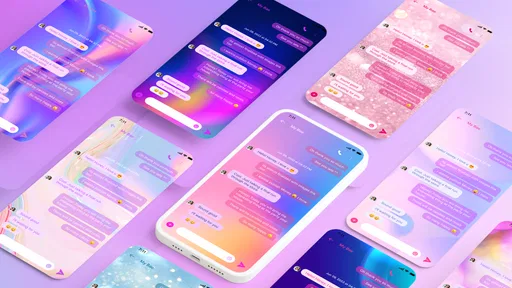
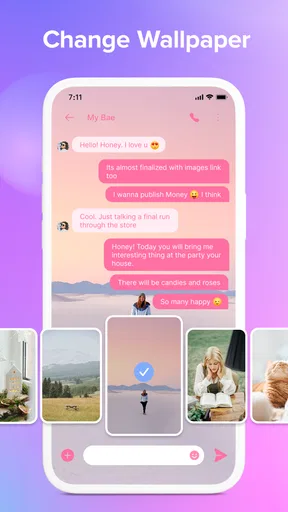
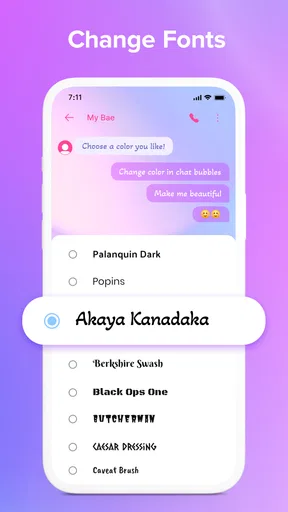
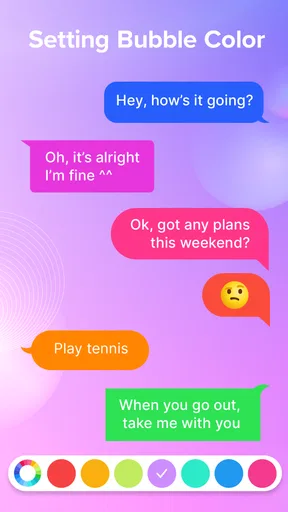
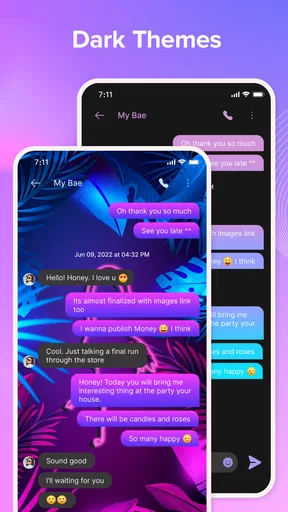
The first thing you’ll notice when you fire up Messenger - Color SMS is the sheer vibrancy. It’s like walking into a candy store for your phone! The app offers a wide array of customizable themes and colors, which means you can ditch the bland, standard SMS look and jazz things up. Whether you’re into something sleek and minimalist or a full-on color explosion, there’s something here for you.
Setting up your personalized theme is super intuitive. I was pleasantly surprised by how easy it was to switch between different color palettes. With just a few taps, I had my SMS threads looking exactly how I wanted them. It's all about making your messaging space feel uniquely yours.
Features That Make a Difference
Beyond the aesthetics, Messenger - Color SMS offers some pretty cool features that enhance the overall messaging experience. For starters, the app supports a variety of emoji packs and stickers. Let’s be honest, sometimes words just aren’t enough, and these little graphics can add a touch of fun or emotion to your conversations.
Another standout feature is the smart notifications. The app allows you to customize notifications for different contacts. So, if you're like me and have some chatty friends who love to text at all hours, you can set specific tones or vibrations to distinguish those priority messages. It’s these small touches that really make the app user-friendly and practical.
Smooth Performance and Usability
Performance is crucial for any app, and Messenger - Color SMS doesn’t disappoint. It runs smoothly, without any noticeable lag or crashes during my use. Loading times for messages are quick, and the interface is clean and straightforward, making navigation a breeze.
I also appreciated the lack of intrusive ads. While some free apps bombard you with pop-ups every few minutes, this app keeps things classy with minimal interruptions, allowing you to focus on your conversations.
Security and Privacy
In today’s digital age, privacy is a big deal. Messenger - Color SMS takes this seriously by offering end-to-end encryption for your messages. This means your conversations are kept secure from prying eyes, which is always a reassuring feature to have.
The app also provides options to lock certain conversations with a password or fingerprint. This adds an extra layer of security, especially if you’re someone who shares a lot of personal information via text.
Final Thoughts
All in all, Messenger - Color SMS is a solid choice if you’re looking to spice up your texting game. It combines aesthetic appeal with practical features, offering a personalized and secure messaging experience. Whether you’re a customization junkie or just someone who appreciates a clean, efficient app, it’s definitely worth giving this one a shot.
So, go ahead and download it. You might just find that it brings a little more joy into your everyday messaging!
Pros
- Customizable themes for unique personalization.
- Smooth integration with existing contacts.
- Easy multimedia sharing options.
- Supports group chats efficiently.
- Low data usage for messaging.
Cons
- Limited stickers compared to competitors.
- Ads can be intrusive at times.
- No end-to-end encryption.
- Occasional syncing issues with devices.
- Some features locked behind paywall.
FAQs for Messenger - Color SMS
What features does Messenger - Color SMS offer?
Messenger - Color SMS provides a vibrant messaging experience with customizable themes, allowing users to personalize their chat backgrounds and message bubbles. It supports multimedia sharing, including photos, videos, and voice notes. The app also offers group chats, emojis, and stickers to enhance communication, making it a fun and engaging platform.
Is Messenger - Color SMS secure for personal use?
Yes, Messenger - Color SMS prioritizes user privacy and security. It includes end-to-end encryption for messages, ensuring that only you and the recipient can read them. The app also allows for secure password protection and supports fingerprint or face recognition for additional security measures.
Can I use Messenger - Color SMS on both Android and iOS devices?
Messenger - Color SMS is available for both Android and iOS platforms. Users can download it from the Google Play Store or the Apple App Store. The app is designed to provide a seamless experience across different devices, ensuring consistent functionality and features on both operating systems.
Does Messenger - Color SMS support multimedia sharing?
Absolutely, Messenger - Color SMS supports a wide range of multimedia sharing options. Users can easily send photos, videos, voice messages, and even GIFs. The app's intuitive interface makes it simple to attach and send files, facilitating richer and more dynamic conversations with friends and family.
Are there any costs associated with using Messenger - Color SMS?
Messenger - Color SMS is free to download and use. However, it may offer in-app purchases for additional themes, stickers, or premium features. Be sure to check for any optional purchases if you wish to enhance your messaging experience with unique customizations or advanced functionalities.


